


Can I keep my name off the contributors page?
- NeronAuthor
- OzzEditor

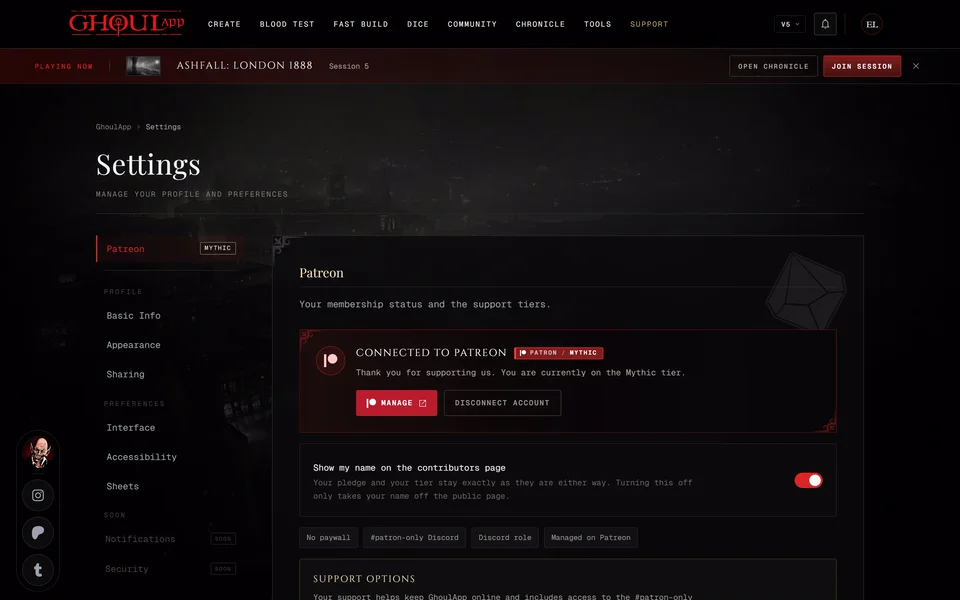
Yes. Open your settings, choose Patreon and turn off Show my name on the contributors page. You'll see "You will not be named on the contributors page." Turn it back on whenever you like.
Your pledge and your tier stay exactly as they are either way. The switch only takes your name off the public page. It shows up once your Patreon account is linked.
What the page shows
The Contributors page lists the people behind GhoulApp in this order:
- The Team: the people who build the app.
- One group for each Patreon tier with the largest tier first and names from A to Z. If you have a GhoulApp account your name shows your picture and links to your profile.
- Storytellers and Communities & Creators who have helped the project.
Patreon supporters are listed while their membership is active. When a membership ends the name leaves the page. To be listed link your Patreon account (see Link your Patreon account).
Was this article helpful?
Related articles
What does supporting on Patreon give me?GhoulApp is free and no finished feature is locked behind a subscription. Supporting on Patreon gets you a supporter badge, Discord roles and your name on the contributors page. Mythic and up also get early access to beta features.Link your Patreon accountConnect Patreon from the Patreon section of your settings so your supporter badge and tier show up in GhoulApp.

About this article
- Type
- FAQ
- Editions
- All editions
Need more help?

Ask the team in #ghoulapp-feedback on the Player Companion Discord. Or try #ghoulapp. GhoulApp players are active there and help each other.
Open Discord(New tab)