


The GhoulApp Discord bot
- NeronAuthor
- OzzEditor

On this page 3
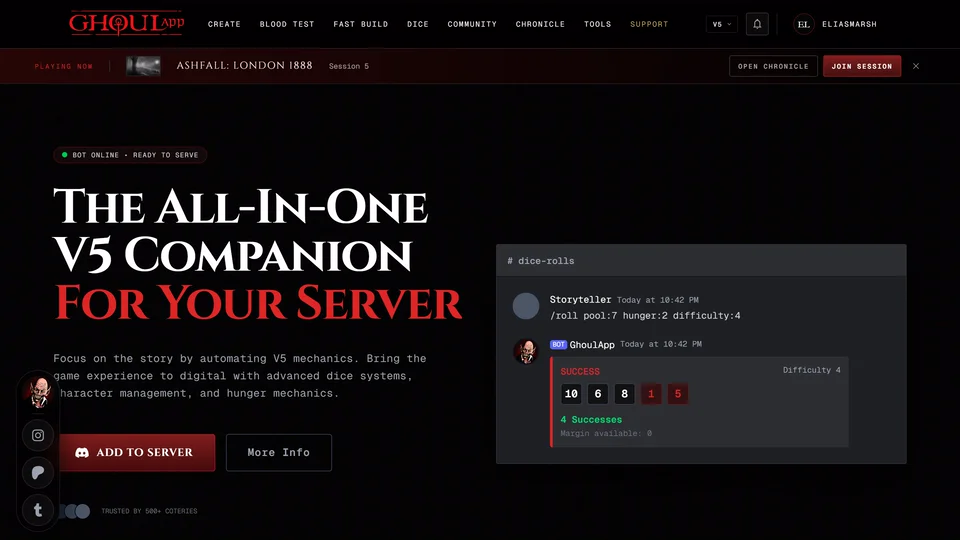
Ghoul is a Discord bot for Vampire: The Masquerade 5th Edition. It rolls V5 dice with Hunger dice, tracks Hunger, Health, Willpower and experience and keeps an XP leaderboard inside your Discord server. It's built for V5 only. V20, Dark Ages and V6 games aren't covered.
The bot is separate from your GhoulApp account and keeps its own characters in Discord. Nothing in GhoulApp links them to your sheets. Continue with Discord on the GhoulApp sign-in screen only signs you in to GhoulApp.
Add it to your server
- Open the bot's page. It's Discord Bot under Pages in the footer at
the bottom of the front page and most other pages. You can also type
ghoulapp.com/discordor search for "Discord Bot" from your home page. - Press ADD TO SERVER at the top or Invite Now at the bottom. More Info scrolls down to the features and the command list.
- Discord asks which server to add it to. Pick one where you're allowed to manage the server and confirm. If you aren't ask the server's owner.
A small Ghoul for Discord notice can pop up in the corner of GhoulApp with Add to Discord and Learn More. Add to Discord goes straight to Discord. Learn More opens the bot's page. Close it and it stays away in that browser for about a month. It waits its turn when another notice is already showing.
The commands
Type / in Discord to see them.
| Command | What it does |
|---|---|
/roll | Rolls dice by V5 rules. |
/character | Opens the bot's character panel. |
/rouse | Makes a Rouse Check. |
/slake | Lowers Hunger. |
/health | Shows Health and takes damage. |
/willpower | Shows Willpower and takes damage. |
/xp | Adds or spends experience and shows the balance. |
/xp list | Shows the XP leaderboard for the whole server. |
Discord shows each command's options as you type it. A roll with a pool of 7, Hunger 2 and Difficulty 4 looks like this:
/roll pool:7 hunger:2 difficulty:4
The bot's page also lists what it does beyond the commands, like the Willpower reroll after a roll and Superficial and Aggravated damage on the Health and Willpower tracks.
Your Discord status
Separate from the bot, GhoulApp can show what you're doing in the app in your Discord status with PreMiD, a browser extension for Discord activity. You install it yourself. GhoulApp has no setting for it and the bot doesn't need it.
Related articles
About this article
- Type
- Guide
- Editions
- V5
Need more help?

Ask the team in #ghoulapp-feedback on the Player Companion Discord. Or try #ghoulapp. GhoulApp players are active there and help each other.
Open Discord(New tab)