


The V5 sheet
- OzzAuthor and editor

On this page 13
This guide walks down the main page of a V5 sheet from top to bottom. For the pages along the bottom, the top bar and how the sheet saves see Find your way around the sheet. Everything here describes the Classic layout. The Compact layout shows the same character in a shorter form (Layouts, themes and looks).
Who the character is
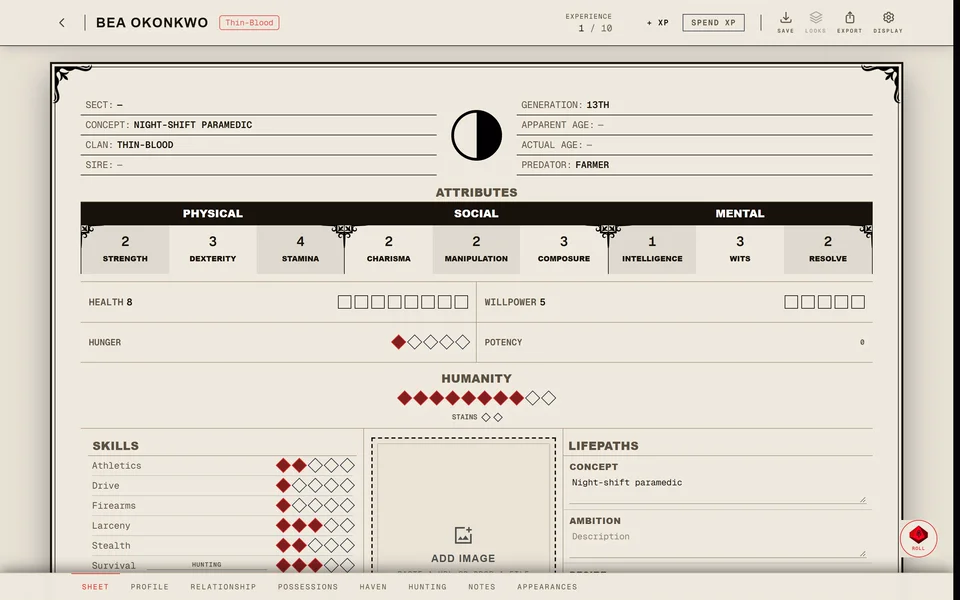
The top of the sheet holds the name, the clan and the Concept. Hover over the clan name to read its Bane and Compulsion. A vampire of the 9th Generation or lower carries an Elder or Methuselah tag next to the clan.
Below that are the details: Chronicle (a link when the sheet is in one), Ambition, Desire, Sire, Predator Type, Generation, Real Age / Date of Birth, Apparent Age and Sect.
- Generation is a list from 4th to 16th. Each entry names its tier, like "13th Generation (Neonate)". Generation also sets how high Blood Potency can go.
- Predator Type shows the character's way of feeding. Pressing it rolls that Predator Type's hunting pool in the dice roller. In Free Edit it opens the list so you can change it.
- In a chronicle where players don't control their sheets Generation and Predator Type are locked for the player. The storyteller can change them.
Attributes and Skills
Attributes come in Physical, Social and Mental columns and Skills follow in the same three groups.
- Press a trait's name to add it to a dice pool. See Roll dice from the sheet.
- With Spend XP on the name buys the next dot instead and shows its price next to it.
- +SPEC adds a specialty to a Skill. It costs 3 XP unless your chronicle sets another price.
- Add under Skills adds a skill of your own.
Disciplines
Each Discipline is marked Clan Discipline or Out-of-Clan. With Spend XP or Free Edit on:
- Add learns a new Discipline. The first dot costs 5 XP in clan and 7 out of clan. A Caitiff pays 6.
- Raising a Discipline asks you to pick a power for the new level.
- An out-of-clan Discipline you added by mistake can be removed. A clan Discipline can be hidden and brought back later.
Press a Discipline's name to add its dots to a dice pool. A character with Blood Sorcery or Oblivion gets its rituals or ceremonies in a card of its own below. See How do I learn a ritual? Thin-bloods have Thin-Blood Alchemy and elders have Elder Powers.
Merits & Flaws
One card holds Merits, Flaws, Backgrounds and Loresheets. Its Edit button turns on Free Edit so you can change them.
The trackers
Five cards sit in a row: Health, Willpower, Potency, Humanity and Hunger. You mark them in the editor while you play. In V5 tracker marks wait for you to press Save.
Health
Health has Stamina + 3 boxes. The Resilience power of Fortitude adds boxes and the card's footer shows the sum it uses.
- Press an empty box to add 1 Superficial damage. It shows as a slash.
- Press a slashed box to turn 1 Superficial into Aggravated. It shows as an X.
- Press an X to heal 1 Aggravated.
Aggravated damage always fills the boxes from the left with Superficial after it.
Willpower
Willpower has Composure + Resolve boxes and takes damage the same way as Health. Pressing the Willpower title opens a Frenzy Check. Pick what the character is resisting (Fury, Hunger or Terror) and roll.
Potency
Potency is Blood Potency. Hover over it to see what the current level gives: Blood Surge, Mend, Discipline Power Bonus, Discipline Rouse Re-Roll, Bane Severity and Feeding Penalty.
Its - and + buttons show with Spend XP or Free Edit on. A new level costs 10 XP times that level. How high and how low it can go depends on Generation and the card tells you when you've reached the limit.
Humanity and Stains
Humanity has - and + buttons in the editor. Each change asks you to confirm because a Humanity shift is a big moment in the story. If your chronicle keeps a record of these changes you can add a reason.
Pressing the Humanity title rolls Remorse.
The Stains row sits under Humanity. It has one box for each empty Humanity dot (10 minus Humanity) and Stains fill in from the right. Press a box to set Stains up to that box. Press the last filled box to take one Stain away.
Hunger
Hunger is a number from 0 to 5 with - and + next to it. The buttons hide while Spend XP is on.
Hunger also changes from the dice. Press Rouse in the dice roller or R to make a Rouse Check. On a 1 to 5 Hunger goes up by one and this change is saved straight away. Only a vampire has the Hunger card.
Convictions & Touchstones
Each Conviction sits next to the Touchstone who anchors it. Use Add for a new pair. If you've made the mortal as a sheet of their own Import picks it from your mortal sheets and links it as the Touchstone. In a chronicle the storyteller can link a Touchstone to an NPC.
The other pages
A V5 vampire gets a Hunting page with Resonance and Hunting notes. A result sent from the Resonance Roller tool shows there with its temperament, resonance and effect.
Possessions has Browse Catalogue to pick equipment from the V5 catalogue.
Ghouls, revenants and mortals
The sheet changes to fit what you're playing:
- A ghoul has a Domitor where a vampire has a Sire. There's no Predator Type, Generation, Potency or Hunger. Disciplines show only the ones the ghoul has learned. The Hunting page becomes Vitae & Bond, with the domitor, the bond strength from 0 to 6 and whether the ghoul is addicted to vitae.
- A revenant works like a ghoul. It belongs to a Family and has a Patron clan.
- A mortal has no Sire, no Disciplines and no Hunting page. The trackers are Health, Willpower and Humanity. Haven is called Residence.
Related articles

About this article
- Type
- Guide
- Editions
- V5
Need more help?

Ask the team in #ghoulapp-feedback on the Player Companion Discord. Or try #ghoulapp. GhoulApp players are active there and help each other.
Open Discord(New tab)