


Roll dice from the sheet
- OzzAuthor and editor

On this page 6
A sheet opened on its own has a dice roller. Press the round ROLL button in the bottom right corner to open it. On a computer it opens as a floating card or a panel docked to the side. On a phone it opens from the bottom.
Build a pool
- Press a trait's name on the sheet, like an Attribute or a Skill. It's added to the pool as a chip.
- Press more names to add them. Press a name again to take it out.
- Set the difficulty if your edition uses one and press the roll button.
Until you pick a trait the roller reads Tap a trait name on the sheet to build a pool. You can also set Pool with its - and + buttons. That clears the chips. After each roll the chips clear so you can build the next one.
While Spend XP is on pressing a name buys a dot instead of adding it to the pool. Turn Spend XP off to roll.
Some powers name their dice pool in their text. Each pool in the text is a button that fills the roller with it. It doesn't roll by itself. A power with no roll gets an activation button that marks it as used in the roller.
V5
The V5 roller has Pool, Diff. (how many successes you need) and Hunger. Hunger starts at the sheet's Hunger. Hunger dice replace dice in the pool. They aren't added on top.
- A die succeeds on 6 or more. Two 10s together are a critical worth four successes.
- A critical with a 10 on a Hunger die is a Messy Critical.
- A failed roll with a 1 on a Hunger die is a Bestial Failure.
Rouse makes a Rouse Check. R does the same when you aren't typing in a field. On a 1 to 5 the sheet's Hunger goes up by one and is saved. Rouse isn't offered at Hunger 5, for a ghoul or on a sheet you can only read.
On your newest roll WP rerolls up to three regular dice for 1 Superficial Willpower damage. Tap the dice to pick them. If you don't pick any it rerolls the lowest failures.
When a roll uses a Discipline the roller can offer a Blood Surge for extra dice and the Rouse Checks the power calls for. A ghoul rolls no Hunger dice.
Pressing Willpower on the sheet opens a Frenzy Check and pressing Humanity rolls Remorse.
V20 and Dark Ages
The roller has Pool and Diff. from 2 to 10. Difficulty starts at 6.
- A die succeeds on the difficulty or more.
- Each 1 cancels a success. A roll with no successes and a 1 is a botch.
- Five or more successes is an exceptional success.
Pressing Willpower or a Virtue's name on the sheet rolls it. The soak line under Health rolls soak.
V6
The V6 roller has Starting Pool and Diff., which starts at 2. In V6 the difficulty takes dice away from the pool before you roll. On a sheet you can edit you can also spend Quickening to add dice after the difficulty. The roller shows the sum so you can check it.
- A die succeeds on 8 or more.
- A roll with no successes and a 1 is a Painful Failure.
- Each 10 earns 1 Quickening, up to 5. Past 5 the roller asks whether the extra goes on the Beast or the Nature tracker.
If the difficulty takes away every die the button reads No Dice.
Dice settings
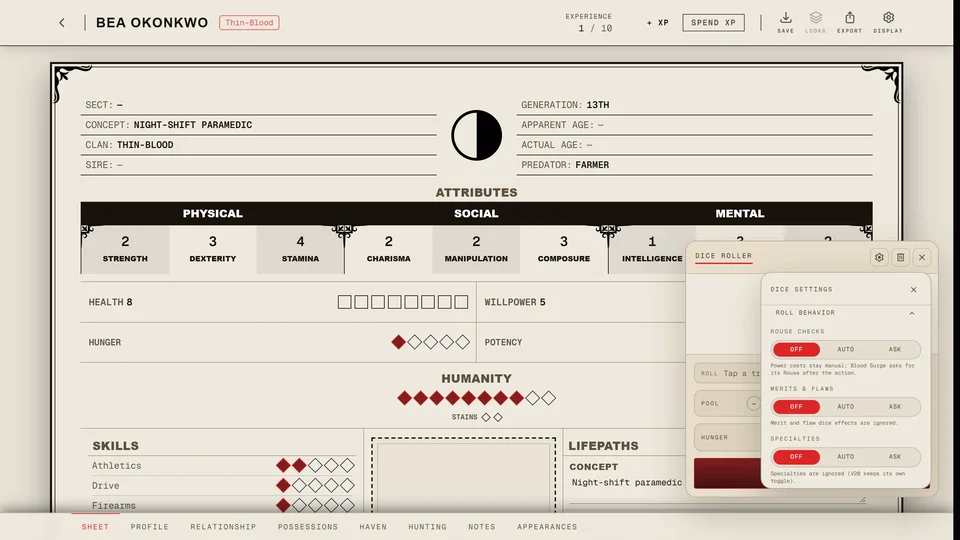
Press Dice settings in the roller's header to open Dice Settings. Esc or the X closes it again.
At the top Result View picks how results show: Log, Compact or Hero. On a wide screen Panel switches the roller between Floating and Docked at the side. A docked roller also closes with Esc.
Under that are switches. Difficulty turns the difficulty field on and off, 3D Dice rolls the dice in 3D and Dice Sounds plays the sound of the roll. A V5 sheet also has Official V5 Dice for the official dice faces.
Roll behavior opens the rest. Each choice there is Off, Auto or Ask and the line under it says what it does.
- Rouse Checks (V5) decides whether the roller makes the Rouse Checks a power or a Blood Surge calls for. Off leaves the power's cost to you. A Blood Surge still asks for its Rouse Check after the action. Auto rolls and saves them after the action. Ask lets you choose for each action.
- Blood Points (V20 and Dark Ages) is the same idea for a power's fixed blood cost. Auto saves the cost before the roll and Ask asks you each time.
- Willpower Success (V20 and Dark Ages) spends 1 Willpower for an automatic success. Ask is the setting the roller suggests.
- Merits & Flaws applies the dice that your merits and flaws add or take away. Auto applies the clear ones and asks about the rest. Ask applies none on its own and you tap each one you want. With Ask on and some reminders dismissed Reset reminders brings them back.
- Specialties works the same way for a specialty on the trait you roll.
Clear History at the bottom empties the roller's history.
Where the rolls go
On a sheet opened on its own the rolls stay in the roller's own history in this browser. Nobody else sees them.
Inside a chronicle the sheet has no roller of its own. Pressing a trait name fills the chronicle's dice tray and the roll goes where the tray sends it.
Related articles


About this article
- Type
- Guide
- Editions
- V5, V20, Dark Ages, V6
In this article
Need more help?

Ask the team in #ghoulapp-feedback on the Player Companion Discord. Or try #ghoulapp. GhoulApp players are active there and help each other.
Open Discord(New tab)