


Share your character
- NeronAuthor
- OzzEditor

On this page 5
To share a character set its sheet to Public and send the page's address. Anyone who opens the link can read the sheet. Nobody else can change it except your storyteller if the sheet is in a chronicle.
Make a sheet public
- Open the character's sheet to read it (not in the editor).
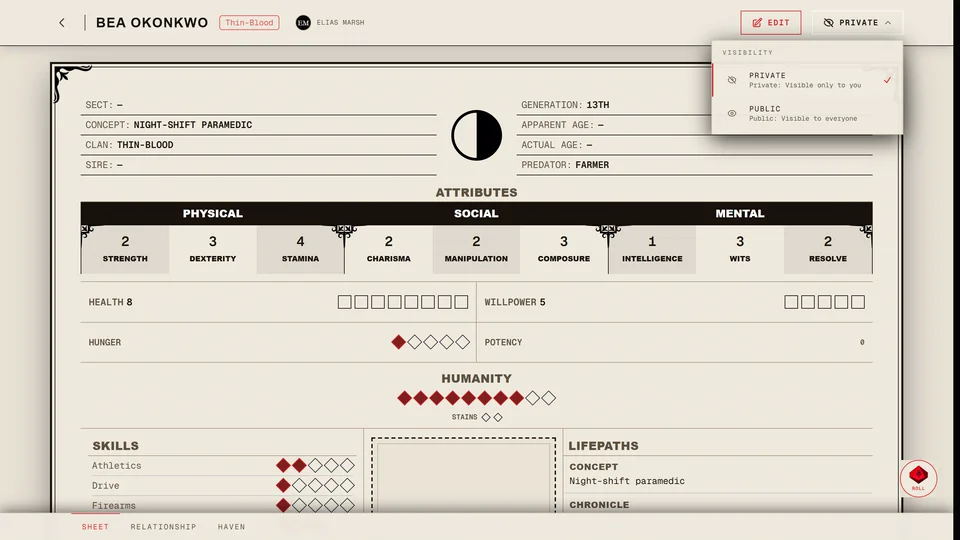
- Press the visibility button in the top bar. It reads Private or Public with an eye next to it. On a phone it's in Menu.
- Under Visibility choose Public. The button now reads Public.
You can also do it from your profile. On the Characters tab open a character's menu and choose Make public. The creator's last step has a Visibility switch with Private and Public. Fast Build asks with Make Publicly Visible when you save. A public character shows in the Community Hub.
The link
There's no separate share button. The link is the address of the sheet's page as your browser shows it. It has /character/ in it. Copy it from the address bar and send it.
A guest character kept only in this browser has no link. Move it into an account first (Can I use GhoulApp without an account?).
What people see
Someone who opens a public sheet sees all of it, every page that has something on it. They can't edit it. They can press Applaud to show they liked it.
If the character has a Facade on, people outside your chronicle see the disguise in place of the real details. See The Facade page.
Make it private again
Choose Private under Visibility. On your profile the same choice is Make private. A private sheet with its old link shows Restricted Access to anyone who isn't allowed to see it.
"Private" doesn't hide the sheet from your chronicle. If the sheet is bound to one:
- The storyteller can always read your whole sheet.
- Other players and observers in the chronicle see a short version: the portrait, the name and anything the storyteller has chosen to reveal.
Your profile link
The Sharing section of your settings is for your profile link. It shows Your Profile URL with Copy Link. See How do I change my name, username or profile link?
Related articles


About this article
- Type
- Guide
- Editions
- All editions
In this article
Need more help?

Ask the team in #ghoulapp-feedback on the Player Companion Discord. Or try #ghoulapp. GhoulApp players are active there and help each other.
Open Discord(New tab)