


How do I put my haven on the chronicle map?
- BluenchanterAuthor
- OzzEditor


Your sheet has to be bound to the chronicle and the storyteller has to turn on Allow player haven linking in the chronicle's settings. Then:
- Open your sheet in the editor and turn on Spend XP or Free Edit. This only unlocks the haven for editing. Nothing is spent.
- Go to the Haven page at the bottom of the sheet. Each haven has a row that reads Not placed until it's on the map.
- On the haven press Place on map. A panel titled Place on map opens at the side with the chronicle's locations.
- Pick a location already on the map or add a new pin.
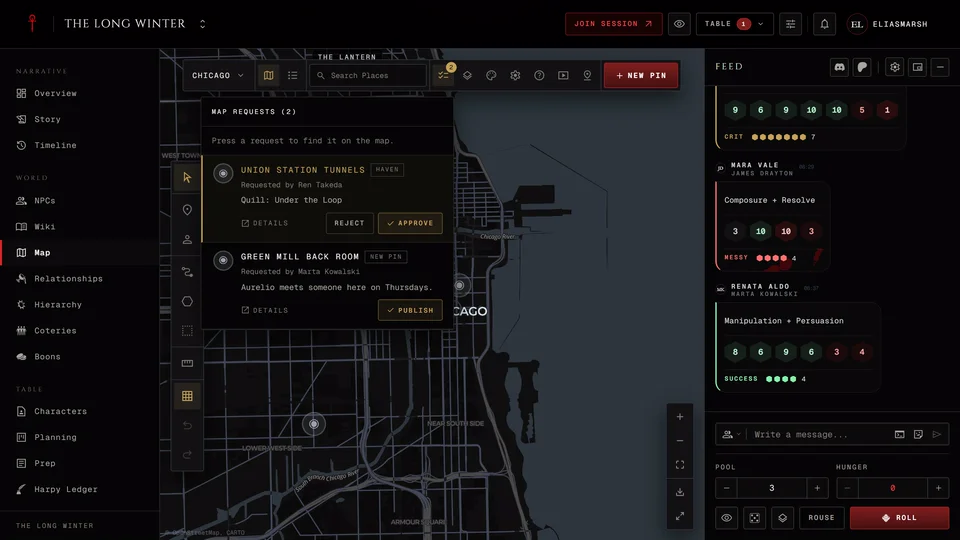
The haven then shows awaiting Storyteller approval. The storyteller sees your request under Map requests on the map. Once they approve it the location is linked to your haven, it shows on the map for the players and the haven reads the location's name. Show on map opens it. To move the haven later press Change location.
When the storyteller places a haven themselves from your sheet it's linked at once with no request.
A few things that stop it:
- There's no Place on map. The sheet isn't bound to the chronicle or the storyteller hasn't turned on haven linking. It also hides while a request for that haven is waiting.
- There's no Spend XP or Free Edit on your sheet. The chronicle is in Storyteller managed or Free Storyteller mode, where only the storyteller changes sheets. Ask them to place the haven for you. In Storyteller approval you still have Spend XP and in Player controlled you have both, so it works there.
- You can't add a new pin. Adding your own pin also needs Allow players to add their own map pins and the chronicle needs a map. Without one you see This chronicle has no map yet. You can still pick a location the storyteller made.
- A location isn't offered. It may already be someone else's haven or be hidden from players. A location can have only one request waiting at a time.
A new pin for a haven always stays hidden until the storyteller approves it, even in a chronicle where player pins appear at once.
Outside a chronicle the Haven page has Set location in its place, which saves a real-world place for the haven.
This works for every edition the chronicle takes. A mortal's Haven page is called Residence.
Related articles

About this article

- Type
- FAQ
- Editions
- All editions
Need more help?

Ask the team in #ghoulapp-feedback on the Player Companion Discord. Or try #ghoulapp. GhoulApp players are active there and help each other.
Open Discord(New tab)