


The Masquerade clock

On this page 7
The Masquerade clock tracks how close the city is to noticing your players. Each breach you log fills part of the clock and raises the heat on one sphere of influence such as the police or the press. When the clock is full the thing you wrote down for that moment happens. The clock is a GhoulApp table aid. It doesn't come from a rulebook.
A clock belongs to a chronicle. You need to be signed in and to run a chronicle as its owner, storyteller or co-storyteller. Archived chronicles aren't listed. Players never see the clock.
Pick the chronicle
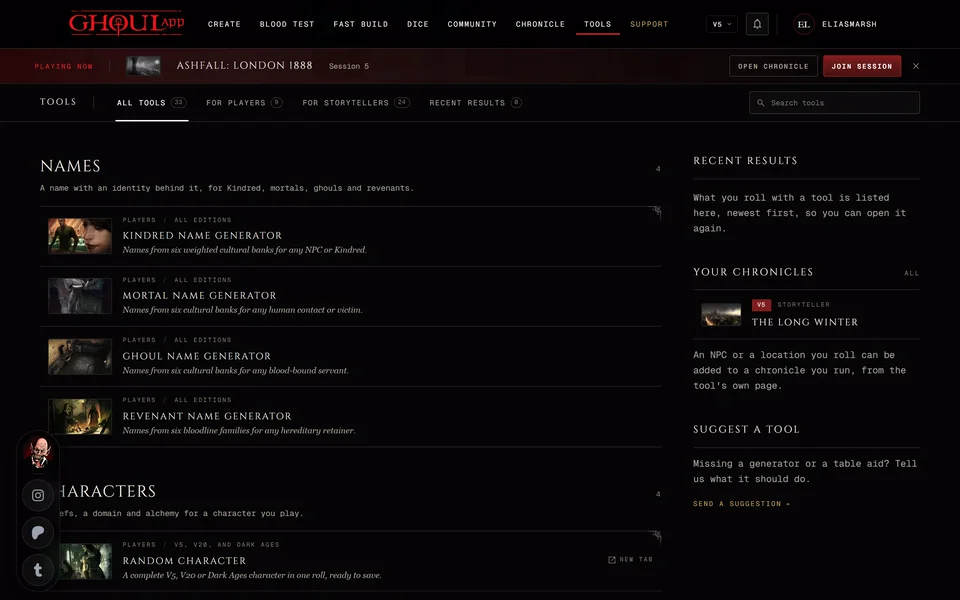
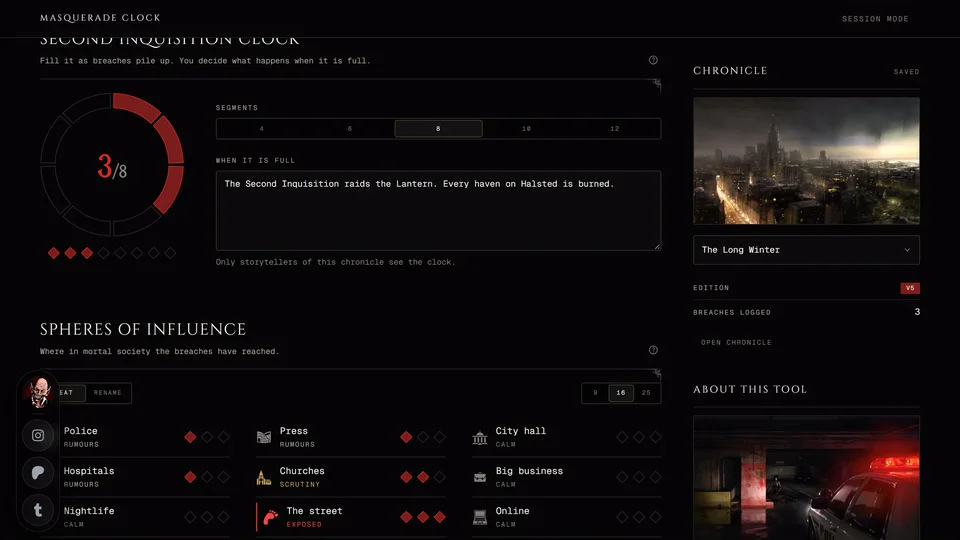
Open Masquerade Clock from the Story group on the Tools page. The Chronicle band lets you pick which chronicle's clock you're working on. It shows the edition, how many breaches are logged and a link to Open chronicle. On a computer the band sits at the side. On a phone it's on the page above the clock.
Changes save on their own. The band says Saving and then Saved. If a save fails the page says "Your last change was not saved." with Save again.
If you don't run a chronicle yet the page says so and offers Open chronicles.
The clock
The clock's name follows the chronicle's edition:
- V5: Second Inquisition clock
- Dark Ages: Inquisition clock
- V20 and V6: Masquerade clock
A V20 chronicle set up as Dark Ages uses the Dark Ages clock. A Custom chronicle uses the edition chosen in the edition menu at the top of the page. That's also the only way to get a V6 clock, since there are no V6 chronicles.
Under Segments choose how big the clock is: 4, 6, 8, 10 or 12. A new clock has 8. In When it is full write what happens when the last segment fills, in up to 500 characters. When it's full the clock says "The clock is full."
Spheres of influence
Below the clock is a grid of Spheres of influence: the parts of mortal society a breach can reach. The size switch offers 9, 16 or 25 spheres and a new clock has 16. Modern games start with spheres like Police, Press, City hall and Hospitals. Dark Ages games start with the Bishop's court, the parish clergy, the nobility and others.
Two tabs above the grid change what you do with it. On Heat you set each sphere's heat by hand: Calm, Rumours, Scrutiny or Exposed. On Rename each sphere becomes a text field so you can call it what it is in your city. Heat on its own never fills the clock. Only logged breaches do.
You can't shrink the grid while a sphere that would disappear still has heat. The page tells you to set those spheres to Calm first.
Log a breach
- Under Log a breach write What happened. This is the only field you must fill.
- Add the Witness, the Evidence and the Response if you want them on record.
- Pick the Sphere that noticed. It's optional and starts on No sphere.
- If that sphere is already Exposed a Spills into field appears. Pick the sphere the heat moves to or leave it on Nowhere. When every other sphere is Exposed too the page says it spills nowhere.
- Under Segments it fills enter 0 to 3, by how bad it is. 0 logs the breach without moving the clock.
- If the chronicle's map has Masquerade breach pins you can link one under Map pin.
- Press Log breach.
The page says "Logged on the clock and the timeline." The clock gains the segments and the sphere's heat goes up one step. When the sphere was already Exposed the heat goes to the sphere it spills into.
In V5, V20 and V6 a small Roll button sits in the Log a breach heading. It fills the fields from the Masquerade Breach Generator and names the tier it rolled. Change anything that doesn't fit. R doesn't press it. Dark Ages has no Roll because the generator's breaches are modern, so you write the breach yourself.
What players see
Nothing. Each breach also adds an event to the chronicle's timeline, named "Masquerade breach" ("Silence of the Blood breach" in Dark Ages), with the witness, evidence, response, severity and sphere. That event is for storytellers only. See Keep things hidden from players for how hidden records work.
The list of breaches
Breaches on this clock lists every breach you've logged, newest first. Each one shows its segments and its sphere, like "Police, spilled into Press" when it spilled. Timeline opens its event. If the event was deleted the row says "Not on the timeline any more."
Remove in a row's menu asks "Take this breach off the clock?" first. It takes the breach off this list only. The timeline event stays and the clock and the spheres don't change back. Change them by hand if they should.
Two storytellers on one clock
If another storyteller saved the same clock while you were working the page switches to their version at once. It says "Another storyteller changed this clock, so it now shows their version. Your last change was not saved." Press Dismiss and make your change again.
The page also reloads the clock when you come back to its tab, as long as none of your own changes is still waiting to save.
Related articles
About this article
- Type
- Guide
- Editions
- All editions
In this article
Need more help?

Ask the team in #ghoulapp-feedback on the Player Companion Discord. Or try #ghoulapp. GhoulApp players are active there and help each other.
Open Discord(New tab)