


See the chronicle as a player sees it


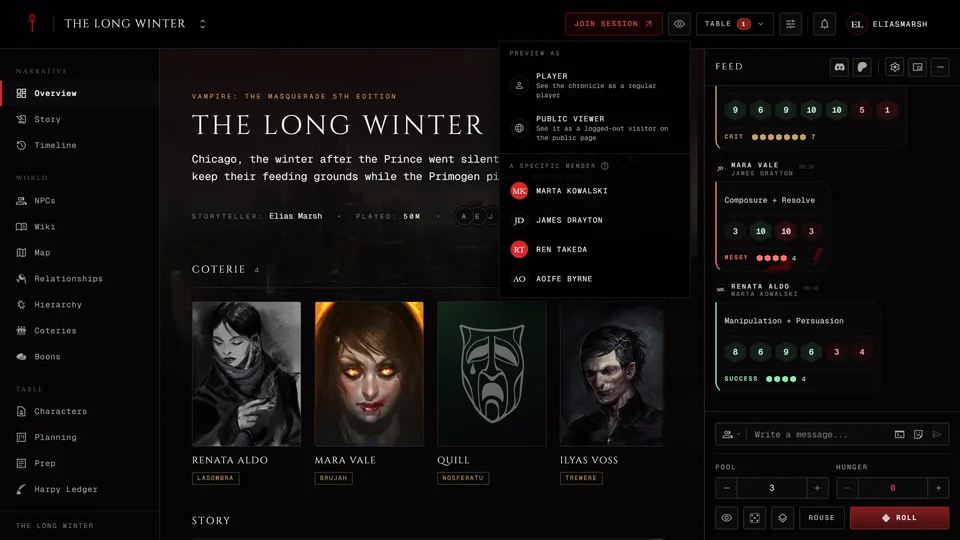
Press in the chronicle's header and pick who to see it as. On a phone the same choices sit at the top of the Profile menu in the bottom bar.
Player shows the chronicle as any player with no special access sees it. Under A specific member you can pick one person at the table and see what they see, including the coteries and anything else revealed only to them. That list leaves out you and the other storytellers, because they'd see everything anyway. Public viewer is a visitor who isn't signed in. It's only offered while the chronicle is public.
A banner at the top tells you whose view you're in. The chronicle then shows only what that person can see and the editing tools are hidden. The preview stays on when you reload and when you come back to the chronicle later in the same browser. Press Exit preview on the banner to go back to your own view. The same button sits at the foot of the menu.
Preview is for the storyteller and co-storytellers. It only changes what your own screen shows and nobody at the table is told. You can look but you can't act as them. To try what a player can write or submit, use a real player account.
Related articles
About this article
- Type
- FAQ
- Editions
- All editions
In this article
Need more help?

Ask the team in #ghoulapp-feedback on the Player Companion Discord. Or try #ghoulapp. GhoulApp players are active there and help each other.
Open Discord(New tab)