


Coteries
- OzzAuthor and editor

On this page 5
Coteries lists the groups in your chronicle: the players' own coterie and any others working the city. The name follows the chronicle's sect. Anarch games have Crews with crew members and Sabbat games have Packs with packmates. The storyteller sets the sect in Settings and the buttons change to match, so New coterie reads New crew or New pack.
You'll find it in the World group and it's always on. Storytellers make and edit coteries. Players read them.
Making a coterie
Press New coterie and give it a name. Pick an Archetype, the closest match from the book list. You can also type a label of your own. In V5 and Custom chronicles each book archetype shows what it usually holds and Apply suggested gains fills that in. It never lowers a value you already set higher. In V20 and Dark Ages the archetype is a label only.
The same page holds the rest. Description is the one line at the top of the coterie's page. Player Visibility says how much players see (below). Then come the domain and the pressure, the shared Backgrounds in V5 and Custom, Public Notes for everyone and ST Notes for you. Only the name is required.
Press Continue and add members. Player characters and NPCs can both join. Press Add beside each one and Finish when everyone's in. To add more later press Add member at the top of the coterie's page (Add crew member or Add packmate in Anarch and Sabbat games).
How much players see
A new coterie starts on Storyteller only, so players don't see it until you choose. There are four levels. Full shows everything. No stats shows the members and the record but hides the numbers. Name only shows the name and the archetype. Storyteller only hides it from every player.
Members of a coterie always see all of their own. Below the levels you can also pick single players to see one coterie in full. You can change the level later from the control at the top of the coterie's page without opening the editor.
Domain and pressure
Every coterie has three domain ratings. Chasse is how good the hunting is, Lien is how deep its ties run and Portillon is how well it's guarded. It also has two kinds of pressure from 0 to 10: Tension inside the group and Exposure to the outside world.
In V5 and Custom chronicles the domain ratings add up to a total out of 15. A coterie can also hold Shared Backgrounds like Haven, Herd or Contacts plus Coterie Advantages and Coterie Flaws. Shared ratings belong to the chronicle and don't add dots to anyone's own Backgrounds.
In V20 and Dark Ages you can still set the domain ratings but they don't add up to anything and there are no shared Backgrounds.
The Stats tab shows all of this with the members' average trust. Storytellers see each member's trust on the Members tab.
Lifecycles
Turn on Coterie lifecycles and stats on the Features tab in Settings if you want the page to sort coteries by how they're doing. It starts off.
A coterie is Under watch when Tension or Exposure reaches 7. Marking it a boon breaker puts it there too. It's Forming while it has fewer than two active members or low trust. In V5 and Custom a domain total under 7 also counts. Everything else is Established.
Lifecycle in the editor starts on Auto: derive, which works it out as above. Pick Forming, Under Watch or Established to pin it there yourself.
With the setting off the page shows each coterie by its members, tagline and notes. Nothing is lost and each coterie still keeps its stats on its own page.
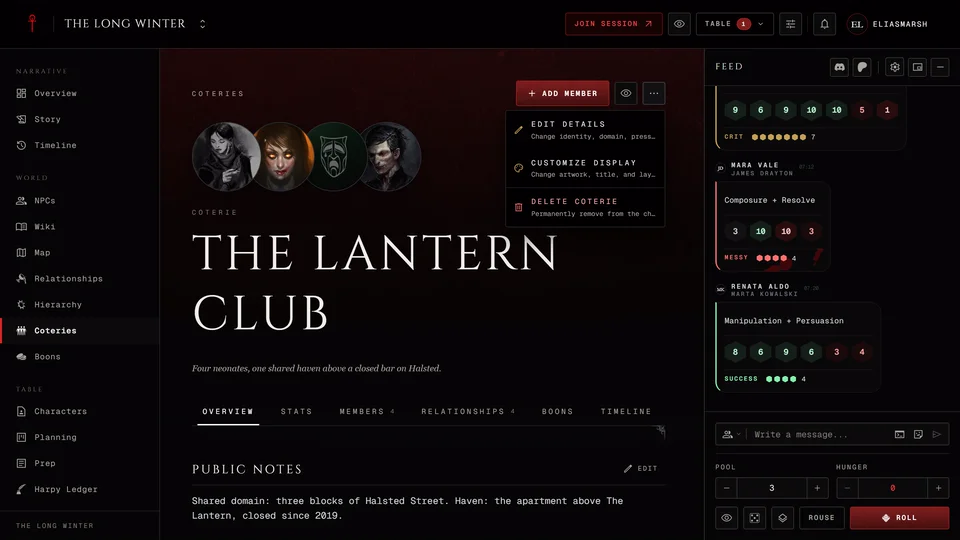
The coterie's page
The tabs are Overview, Stats, Members, Relationships, its boons and Timeline. Players get fewer of them on a lower level. No stats keeps Members, Relationships and boons but drops Stats and Timeline. Name only leaves the Overview.
Storytellers open Coterie actions at the top. Edit details opens the editor again. Customize display changes the look: a cover, a profile picture, a wordmark in place of the title, the title's font and size and which parts of the header show. Its Mechanical stats switch hides the Stats tab for a group that's only there for the story. Delete coterie asks you to type the coterie's name and can't be undone.
Related articles
About this article
- Type
- Guide
- Editions
- V5, V20, Dark Ages, Custom
Need more help?

Ask the team in #ghoulapp-feedback on the Player Companion Discord. Or try #ghoulapp. GhoulApp players are active there and help each other.
Open Discord(New tab)