


The chronicle map
- BluenchanterAuthor
- OzzEditor

On this page 9
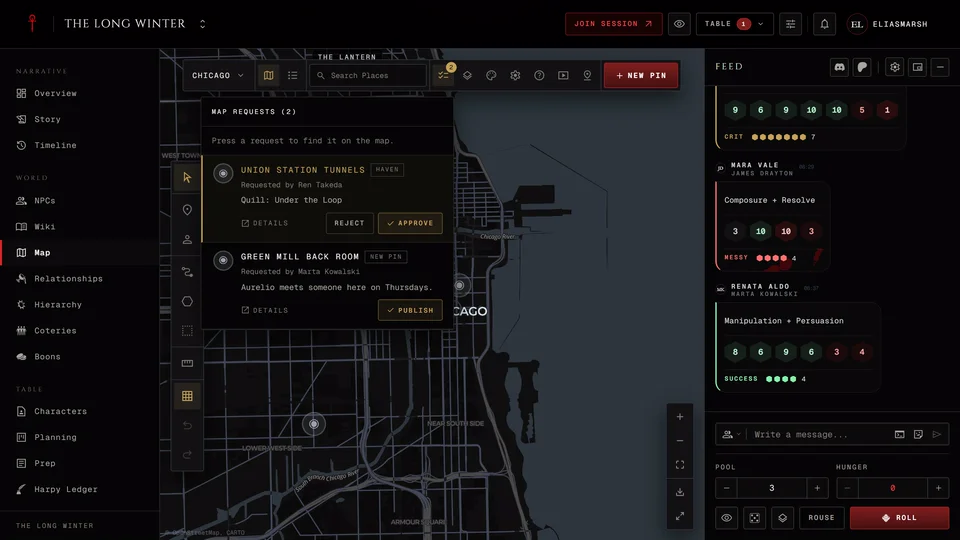
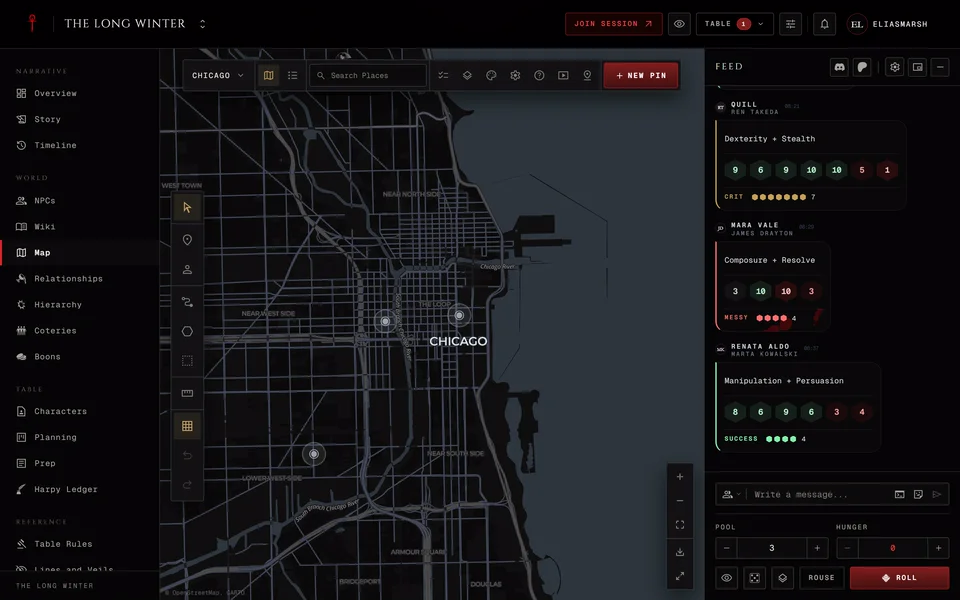
The Map is where your chronicle's city lives: the havens, Elysium, who holds which neighbourhood and how the places connect. The storyteller builds it. Players look around and add pins of their own if you let them.
It sits in the World group. A storyteller can switch it off for the whole chronicle (see Turn sections on or off).
Starting a map
A new map is blank. Press Open background settings in the middle or Background in the bar at the top and pick what the map is drawn on.
A World map uses real streets. Search for your city and choose how close the view starts, from a whole region down to single buildings. A Custom image is your own picture, like a floor plan or a hand-drawn city. A Blank canvas is an empty grid for diagrams. Pictures and blank canvases can take a square grid, a hex grid or none. You can change the background later with the same button.
The colour of world maps is set once for the whole chronicle. Look for Map appearance in Settings.
More than one map
A chronicle can hold several maps, say the city and the inside of the Prince's manor. The map's name at the top left opens the list of maps. New board adds one and each map's own menu has Edit map, where you rename it and choose who can open it. Pins belong to the map they were dropped on, but searching can still find a place on another map and take you there.
Map and List in the bar switch between the map itself and a plain list of its places.
The tools
On a computer the tools run down the left side. On a phone they sit along the bottom. The key after each one is its keyboard shortcut. Keys do nothing while you're typing in a field.
You'll mostly use Select V to look around and drag pins, Pin P to drop a place and Route R to join two pins. Token C puts an NPC or a character on the map. Territory Z draws a filled area such as a domain: press Enter to close the shape or Esc to give up. Boundary B outlines a sect's domain the same way. You can also close a shape by pressing its first corner again.
Fog G hides an area until you reveal it. It only shows up once you turn on Fog of war in Map settings. Measure M measures distances. On a picture or a blank canvas it's always there. On a world map you turn on Measure tool in the settings first.
Esc cancels what you're in the middle of. While you draw it throws the shape away and after the first pin of a route it lets go of that pin. When there's nothing to cancel it takes you back to Select.
Ctrl+Z remembers your last 30 changes until you switch maps or leave the page. Ctrl+Y or Ctrl+Shift+Z redoes them. On a phone Undo and Redo sit in the menu behind the three dots at the top, next to Snap to grid. ? lists every shortcut.
In a live session R rolls Rouse instead, so pick Route from the tools there.
Adding a place
Choose Pin and press the map where the place is or press New pin in the bar. Give it a name and a description. Under Pin you can pick a symbol and an Override color. Under Links you can tie it to an NPC, a character or a coterie and Visible to players decides whether players see it. Anything you write in Storyteller notes stays with you. Press Create when you're done.
To move a pin later drag it with Select. Right-click a pin or a territory to edit it.
On a world map you can also look a real place up. Find a place in the bar (Find place by name on a phone) takes a city, a district or an address and lets you show it, outline it or add it as a pin or a domain.
If a place is someone's haven fill in Haven of. Players can link their own haven too when you allow it (see Put your haven on the map).
Territories
A territory has a name, an owner, a status and a style. The owner can be nobody, a clan, a sect, a cult, a coterie (or crew or pack), a player character or an NPC. Marking it Contested, Fallen or Unknown gives it a dashed border.
The rest depends on the edition. In V5 a territory has three ratings: Chasse for how good the hunting is, Lien for how deep its ties run and Portillon for how well it's guarded. Good hunting makes it glow and weak guarding gives it a dashed edge. In V20, Dark Ages and Custom games a territory gets a place in the hierarchy with a rank or title instead. In V20 it's filled with the sect's colour and the Prince's domain gets a halo over the city. Dark Ages domains also have Area, Defense, Prosperity, Secret Ways, Populace, Servants, Settlement and True Faith and a Dark Ages chronicle can drop a Companion domain onto the map with its people, places and factions in one go.
A place's own page
Open a place to see everything about it: the description, photos, who's there, what's inside it and who controls it. Open on map takes you back.
Storytellers manage the place from Manage this location. That's where you edit it, add photos, give it a Facade or delete it. A Facade shows players a disguised version of the pin. You can also choose who sees the place (more in Keep things hidden from players).
You can hand a place to a player to look after. Turn on Allow assigned editors under Location management in Settings, then pick the player as the place's Assigned editor. They can keep its description and photos up to date. Switching the setting off takes that away from everyone at once.
Layers and settings
When the map gets busy Layers hides kinds of things: pins, territories, annotations, routes or fog. A storyteller also gets three quick presets there: Storyteller, Player view and Plot view. Show on map hides single kinds of pin, like every haven. Players get the pins, territories and routes switches. What you hide is hidden only for you on this device.
Map settings holds two kinds of switch. Under This device are effects like mouse parallax, which only change your own screen. This board, for everyone changes the map for every viewer: pin labels, region colours, fog of war, 3D camera tilt with buildings and terrain, the globe, the scale bar, the Measure tool and whether new tokens start hidden. Period map is for a game set in the past. It hides modern buildings and roads and needs an in-world year before 1900 in the chronicle's settings. Saving to a file and loading from one is also there (see Import and export a map).
Showing the map to the table
At the table you can put a clean player view of the map on a projector or a second screen. Press Present in the bar. Open player window opens it in a second window you can drag to the other screen. Present on this screen fills your own screen with it. Either one shows only what players are allowed to see and follows where you move the map. Its own small controls let you hide layers or pin types on the projection without changing the map.
If the browser blocks the window, allow pop-ups for the site and try again. Present isn't in the bar during a live session, which has its own stage (see Show the table on a second screen).
What players can do
Players see the maps and places you let them see. They can search, open place pages and hide layers for themselves, but they can't move or change your places. With player pins on they can add their own (see Player pins on the map).
Related articles
About this article
- Type
- Guide
- Editions
- All editions
In this article
Need more help?

Ask the team in #ghoulapp-feedback on the Player Companion Discord. Or try #ghoulapp. GhoulApp players are active there and help each other.
Open Discord(New tab)