


Storylines
- Lithaner555Author
- OzzEditor


On this page 5
Say one character is hunting for their sire and it comes up every few nights between everything else. A chapter can't hold that, because every session sits in exactly one chapter. A storyline can. It runs across as many sessions as it takes and one session can carry several storylines.
Storylines live on the Story page in their own Storylines band. Storytellers make them. Players read the ones meant for them and can propose their own.
Starting one
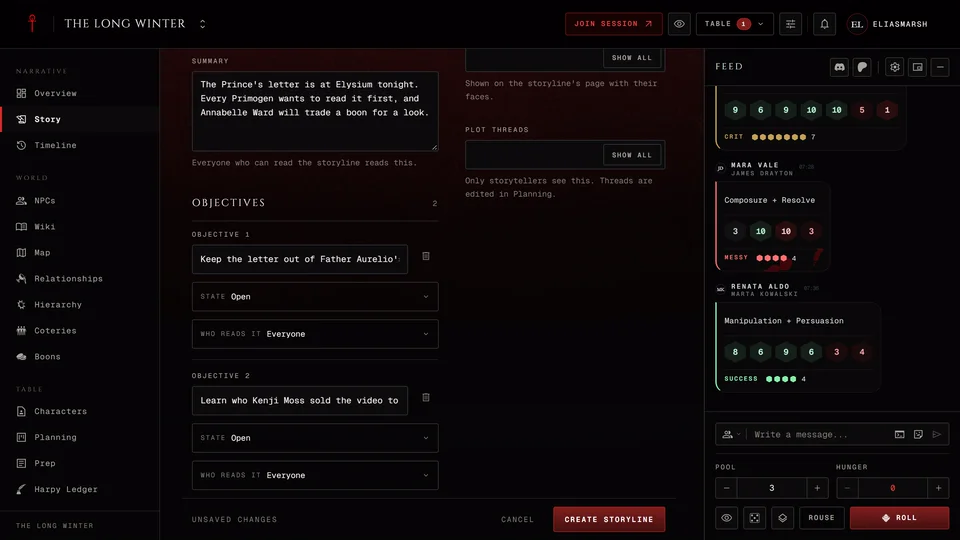
Storytellers press New storyline. Give it a Title players will recognise and a Summary. Everyone who can read the storyline reads the summary.
Who it is for decides who that is. Whole table is every member of the chronicle. Coterie is the players with a character in the coterie you pick. Personal is the player of one character. Storytellers always read every storyline.
Add objectives with Add an objective. Each one has a State (Open, Done or Failed) and its own Who reads it. Everyone means everyone who can read the storyline. Storyteller only keeps that objective to you. You can also share one objective with a few characters, so one player knows a goal the rest of the table doesn't.
People and places shows the faces involved on the storyline's page. Plot threads ties it to your threads in Planning. Only storytellers see those. Press Create storyline when it's ready.
Linking sessions
On the storyline's page press Link a session and tick the nights it came up in. Linking changes nothing in the session itself. The page then lists the sessions in the storyline with its first and last one. A session's own page shows its storylines too.
Closing it
When the thread ends press Close the storyline. Pick how it ended: Resolved, Failed, Abandoned or Dormant. What happened is read by everyone who can read the storyline. What it changed can be kept Only for storytellers if it's a consequence players mustn't see yet. You can also say which session it closed in and which people and places it touched.
A closed storyline keeps its page. Reopen brings it back. The storyline's menu also has Edit storyline and Delete storyline.
What players see
Players see the Storylines band once there's at least one storyline they're allowed to read. They read the summary, the objectives meant for them, the linked sessions and the people and places. Plot threads stay with the storytellers.
Proposing a storyline
Players can pitch a storyline for one of their characters. Press Propose a storyline at the top of the Storylines band on the Story page. The band only shows once there's a storyline you can read, so at a table with none yet ask the storyteller. Give it a Title, write What you want to explore and pick Whose storyline it is. You need a character in the chronicle to propose one.
Start from the sheet lists lines from that character's sheet that you can add with Add. What it offers depends on the edition. A V5 sheet offers the Ambition, Desire, Convictions and Touchstones. A V20 sheet offers the Path, Nature and Demeanor and a Dark Ages sheet the Road, Nature and Demeanor. A V6 sheet offers the Nature, the Humanity scale and the Code of Honor. Press Send to the storyteller when you're done.
Until the storyteller answers only you and the storytellers can read it. Your proposals show in the band as Waiting or Declined.
The storyteller finds it in the band marked Proposed and opens it. It's already filled in as a personal storyline for that character and they can change anything. Create storyline accepts it. Decline asks for an optional note. The player sees it was declined along with the note and nobody else sees it.
Related articles

About this article
- Type
- Guide
- Editions
- All editions
Need more help?

Ask the team in #ghoulapp-feedback on the Player Companion Discord. Or try #ghoulapp. GhoulApp players are active there and help each other.
Open Discord(New tab)