


Notes
- BluenchanterAuthor
- OzzEditor


On this page 4
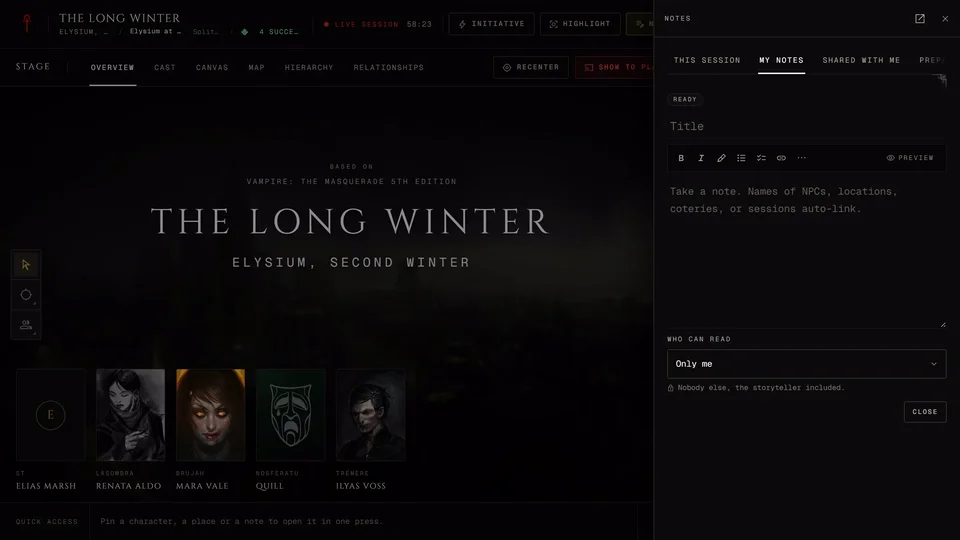
Notes is your own notebook for the chronicle. Players and storytellers each get one. A new note is private and private means nobody else reads it, the storyteller included.
It's in the Narrative group and it's always there. Moderators, observers and visitors on a public link don't get it.
Writing a note
Press the Take a note box at the top and start typing. New note under Add does the same.
Give it a title if you like. Enter in the title jumps you to the text. Names of NPCs, places, coteries and sessions turn into links by themselves as you type and show as small chips under the note. If one links by mistake press the cross on its chip.
The toolbar has bold, italic, headings, quotes, lists, task lists, links, tables and highlights in four colours. In a list Enter starts the next item and Tab or Shift+Tab moves it in or out. Preview shows how the note will look. Tag adds one of the chronicle's NPC tags.
Notes save as you write. Ctrl+S saves right away. Close or Esc saves and closes the note.
Sharing a note
Each note has a pill that reads Private or Public. Press it to switch. Public lets every member of the chronicle read it. Only you can edit it and you can switch it back whenever you like.
The tabs at the top are All, Pinned and Public. All and Pinned are your own notes. Public is every shared note in the chronicle with the name of whoever wrote it.
Pin keeps a note at the top. To wiki turns it into a wiki article and opens it (see The chronicle wiki). Delete a note from its own page with Delete note.
Notes at the live table
During a session Notes in the top bar opens your notes in a rail with three tabs: This session, My notes and Shared with me. Storytellers get Prepared notes too. Open Notes hub jumps to the full page.
At the table a note asks Who can read it. Only me means nobody else reads it, the storyteller included. Storyteller means you and the storytellers. Chosen people is you, whoever you tick and the storytellers. If you're in a coterie My coterie ticks the whole coterie at once. Everyone is every member.
Open a note to read it and its replies. The author and the storyteller can reply and anyone who can read the note can read the replies. Only the author can edit the note itself. Use in this session in a note's menu links an older note to tonight's game.
Prepared notes
Storytellers get a Prepared notes tab with their own notes, ready to bring into a session. Use in this session adds one. Share with Chronicle makes it public on the Notes page without putting it on anyone's screen.
A storyteller can also start a timeline entry from any note in the rail with Add to timeline in its menu. The timeline editor opens filled in from the note and set to hidden from players until you change that.
On the Notes page a storyteller's own notes also have Hand out as paper beside To wiki. It makes a paper handout from the note (see Handouts).
Related articles
About this article
- Type
- Guide
- Editions
- All editions
In this article
Need more help?

Ask the team in #ghoulapp-feedback on the Player Companion Discord. Or try #ghoulapp. GhoulApp players are active there and help each other.
Open Discord(New tab)